|
Wait
Event
|
Possible
Causes
|
Look
For / Examine
|
|
|
buffer
busy
waits
|
Buffer
cache, DBWR
|
Dependent
on type of buffer:
|
Examine
V$SESSION_WAIT
while the problem is occurring to determine the type of block
contended for.
|
|
free
buffer
waits
|
Buffer
cache, DBWR, I/O
|
Cache
too small
|
Check
buffer cache statistics for evidence of too small cache.
|
|
db
file
scattered
read
|
I/O,
SQL statement tuning
|
Slow
I/O system
|
Cross-check
I/O system and
V$FILESTAT
for poor read time. |
|
db
file
sequential
read
|
I/O,
SQL statement tuning
|
Slow
I/O system
|
Cross-check
I/O system and
V$FILESTAT
for poor read time. |
|
enqueue
|
Locks
|
Depends
on type of enqueue
|
Look
at
V$ENQUEUE_STAT.
|
|
latch
free
|
Latch
contention
|
Depends
on latch
|
Check
   V$LATCH.
|
|
log
buffer space
|
Log
buffer, I/O
|
Slow
I/O system
|
Check
the statistic redo buffer allocation retries in
V$SYSSTAT.
Check configuring log buffer section
Check
the disks that house the online redo logs for resource
contention.
|
|
log
file sync
|
I/O,
over- committing
|
Un-batched
commits
|
Check
the number of transactions (commits + rollbacks) per second, from
V$SYSSTAT. |
Showing posts with label Architecture. Show all posts
Showing posts with label Architecture. Show all posts
Friday, June 29, 2012
Wait Events and Potential Causes in Oracle

Saturday, May 26, 2012
How to avoid the checkpoint not complete error in Oracle 9i
if you frequently load large amounts of data in an Oracle database, then it is very likely that you get the message checkpoint not complete in the alert log file oracle.
The "checkpoint not complete" messages are generated because the logs are switching so fast that the checkpoint associated with the log switch isn’t complete.

The "checkpoint not complete" messages are generated because the logs are switching so fast that the checkpoint associated with the log switch isn’t complete.
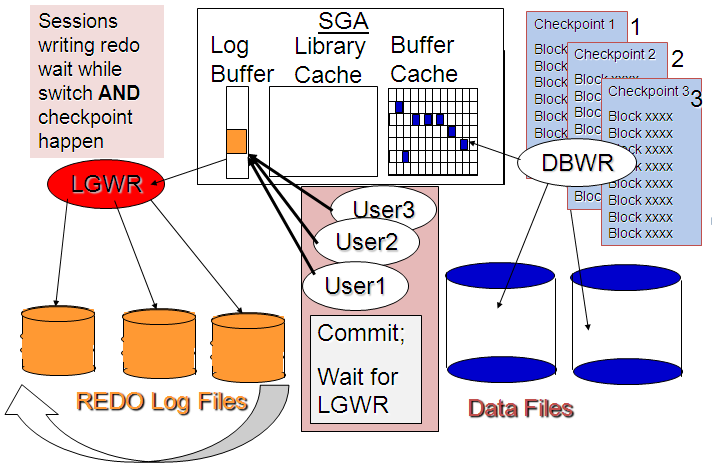
Oracle suggests that you
might consider setting archive_lag_target to zero to reduce
"checkpoint not complete" messages:
alter system set archive_lag_target=0 scope=both;
Overall Oracle performance
can be dramatically improved by increasing the log sizes so that
logs switch at the recommended interval of 15 to 30 minutes.
Identify the current size
of the redo log members from v$log, record the number of
log switches per hour and increase the size of the log to allow
Oracle to switch at the recommended rate of one switch per 15 to 30
minutes.
For example, if the database redo log size is 1
megabyte and you are switching logs every 1 minute, you will need to
increase the log size to 30 megabytes in size to allow it to switch
every 30 minutes.
You need to ensure that the on-line redo logs
don’t switch too often during periods of high activity and switch
often enough during times of low processing workloads.
This should reduce the delays from the checkpoint
not complete errors.
Oracle Shared pool layers
The shared pool caches various types of program data. For example, the shared pool stores parsed SQL, PL/SQL code, system parameters, and data dictionary
information. The shared pool is involved in almost every operation that
occurs in the database. For example, if a user executes a SQL
statement, then Oracle Database accesses the shared pool.

When a SQL statement is executed, the database attempts to reuse previously executed code. If a parsed representation of a SQL statement exists in the library cache and can be shared, then the database reuses the code, known as a soft parse or a library cache hit. Otherwise, the database must build a new executable version of the application code, known as a hard parse or a library cache miss.

The data dictionary is accessed so often by Oracle Database that the following special memory locations are designated to hold dictionary data:
A client result cache differs from the server result cache. A client cache is configured at the application level and is located in client memory, not in database memory.
Allocation of memory from the shared pool is performed in chunks. Chunking allows large objects (over 5 KB) to be loaded into the cache without requiring a single contiguous area. In this way, the database reduces the possibility of running out of contiguous memory because of fragmentation.
Infrequently, Java, PL/SQL, or SQL cursors may make allocations out of the shared pool that are larger than 5 KB. To allow these allocations to occur most efficiently, the database segregates a small amount of the shared pool for the reserved pool.

Library Cache
The library cache is a shared pool memory structure that stores executable SQL and PL/SQL code. This cache contains the shared SQL and PL/SQL areas and control structures such as locks and library cache handles. In a shared server architecture, the library cache also contains private SQL areas.When a SQL statement is executed, the database attempts to reuse previously executed code. If a parsed representation of a SQL statement exists in the library cache and can be shared, then the database reuses the code, known as a soft parse or a library cache hit. Otherwise, the database must build a new executable version of the application code, known as a hard parse or a library cache miss.

Data Dictionary Cache
The data dictionary is a collection of database tables and views containing reference information about the database, its structures, and its users. Oracle Database accesses the data dictionary frequently during SQL statement parsing.The data dictionary is accessed so often by Oracle Database that the following special memory locations are designated to hold dictionary data:
-
Data dictionary cache
This cache holds information about database objects. The cache is also known as the row cache because it holds data as rows instead of buffers.
-
Library cache
Server Result Cache
Unlike the buffer pools, the server result cache holds result sets and not data blocks. The server result cache contains the SQL query result cache and PL/SQL function result cache, which share the same infrastructure.A client result cache differs from the server result cache. A client cache is configured at the application level and is located in client memory, not in database memory.
Reserved Pool
The reserved pool is a memory area in the shared pool that Oracle Database can use to allocate large contiguous chunks of memory.Allocation of memory from the shared pool is performed in chunks. Chunking allows large objects (over 5 KB) to be loaded into the cache without requiring a single contiguous area. In this way, the database reduces the possibility of running out of contiguous memory because of fragmentation.
Infrequently, Java, PL/SQL, or SQL cursors may make allocations out of the shared pool that are larger than 5 KB. To allow these allocations to occur most efficiently, the database segregates a small amount of the shared pool for the reserved pool.

Subscribe to:
Posts (Atom)